Gecko v7 Gecko v7
  • +44 (0) 131 240 3390
  • +44 (0) 131 240 3390
  • Gecko Agency
    Design
    Brand Strategy
    Web Design
    Development
    Umbraco
    Custom API Integrations
    Custom Web Development
    Virtual Website Planning
    Digital Marketing
    Search Engine Optimisation
    Paid Search Marketing
    Content Marketing
    Social Media Marketing
    Support
    Support Packages
    Blog
    Case Studies
    About Us
    Careers
    Contact

    An Introduction to Web Components

    1st October 2019

    What are Web Components?

    The progress in web development is moving at a faster pace than ever before. Each year there is new functionality added to browsers that increases the speed at which we can develop new apps and websites. One of the most recent and popular additions to the web development toolkit is Web Components. 

    Web Components are the terms used to encapsulate three separate technologies. Each of these could be used alone and still considered web components but they are best used together for the best effect.

    Before I get into these elements it is only fitting that I assume you have a good knowledge of HTML, CSS and JavaScript. If not, don’t worry, you can always read on and glean something new that you might not have known before. 

    Custom Elements

    Custom elements are HTML elements that are not within the standard spec. You can create a new HTML element and add it to your website and take control of how it is displayed and how it behaves. Standard HTML elements such as <div>, <nav> and <blockquote> are all well and good but if you would like to create something new you could create a component.

    In the above example, I have created our very own custom element called gecko-quote. It is currently only adding a hardcoded quote wrapped in some standard HTML elements. This doesn’t seem like a huge leap in technologies but it is only the start of what I will show you.

    Custom elements are independent of frameworks and can be used across many of the newest browsers. I will get to support later.

    Shadow DOM

    The shadow DOM works in very much the same way as an iframe. It is an encapsulated version of the main DOM, which is referred to as the Light DOM. This allows authors to isolate and style elements within the shadow DOM independently without causing any issues with the light DOM. 

    Let us continue our gecko-quote example by adding some styles.

    HTML Templates

    HTML Templates are one of those things that has been around in many different forms before but have only been standardized recently. In days past, if you wanted this kind of functionality would need to lean heavily on javascript libraries such as mustache or handlebars. Now this is a standard part of HTML and it comes under the umbrella of Web Components. Below is a simple example of this.

    Within this example, I have created a simple template using the new <template> element and added an ID to it. With this, I am easily able to cycle through a list of the quote and print them using the template as defined in the HTML. 

    This is a departure from the above two parts of web components but all three can be used independently from one another and also can be used in conjunction for maximum effect. 

    Why I don’t use Web Components (on Websites)

    As powerful and useful as web components are there are still a few drawbacks that have prevented me from using them in my standard workflow. 

    #1 Accessibility

    Yes, that old chestnut. As the internet has become so much bigger and more people are spending their free time on it, it has become more important to have an accessible, easy to use site. 

    With that said Web Components rely on Javascript to load the content into the page and therefore cannot always be relied on to work perfectly with screen readers and will not work with browsers that have JavaScript disabled.  

    #2 Support

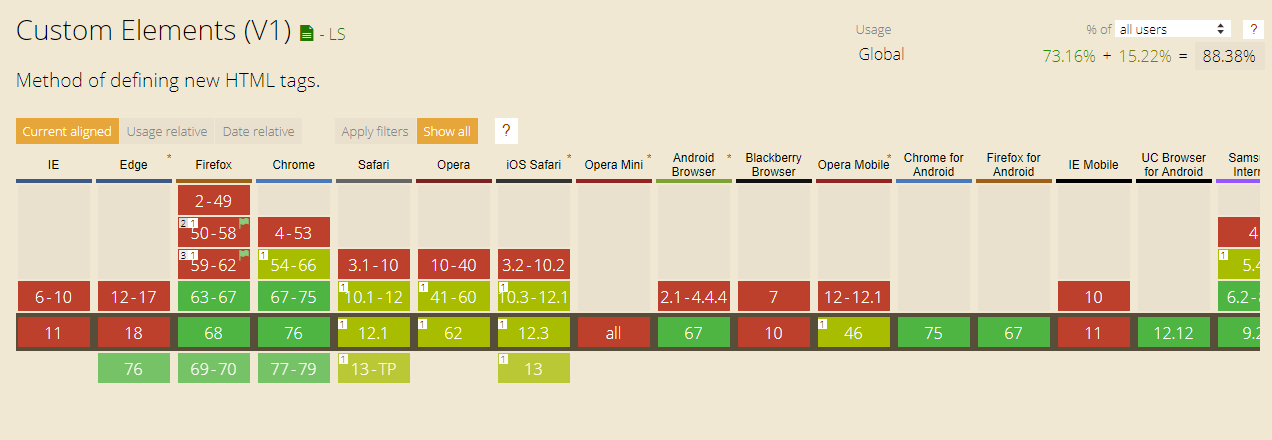
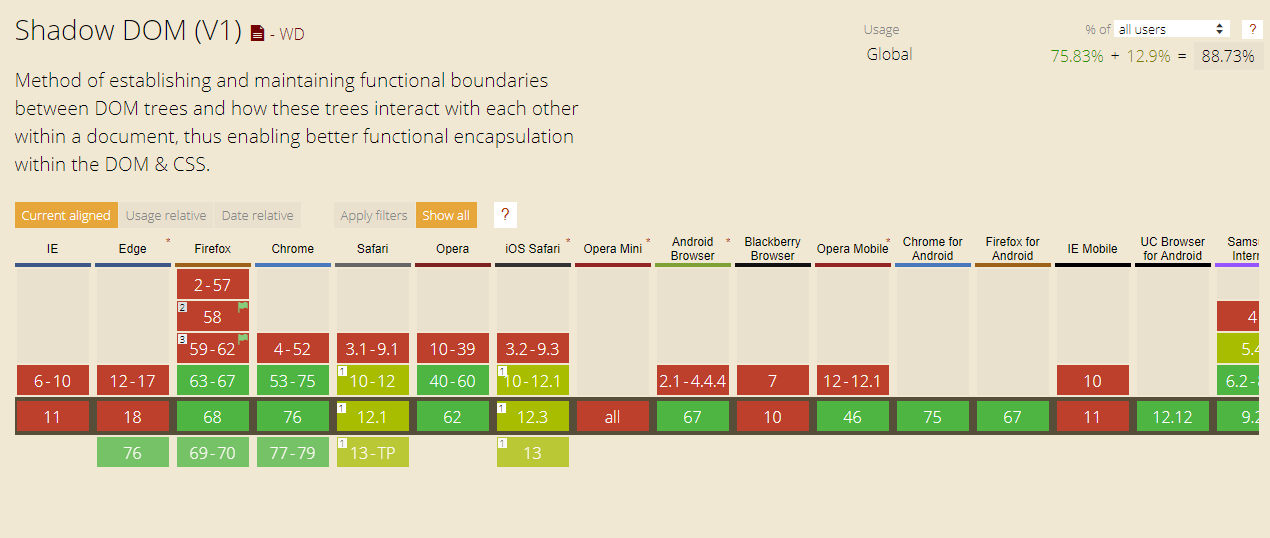
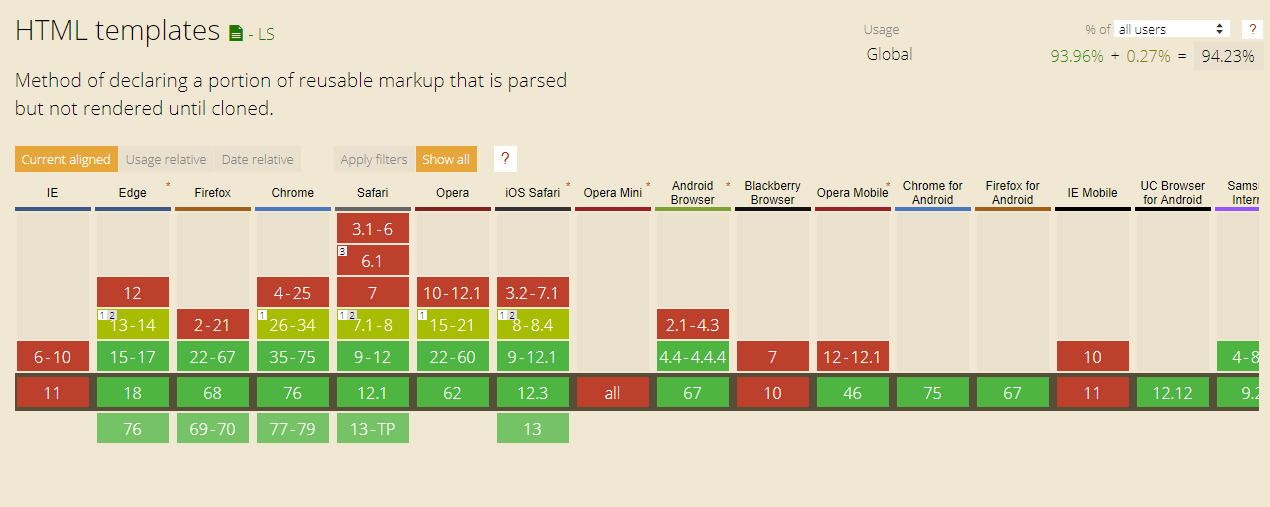
    All three parts of Web Components have varying levels of support the one major flaw in them in lack of support in IE11, Edge and only partial support in Safari. 

    Custom Elements
    Shadow DOM
    HTML Templates
    I know polyfills exist but I think they are cumbersome. If a client requires their site to run on IE6 then you need to build the site so everything works as standard on that platform, not to build it on the latest browsers and try to force it to work on IE6. 

    How I use Web Components

    Since I don’t use Web Components on websites you may be asking why I would write about them with such fondness. Well, the truth is I do use them, but only on mobile apps. Yes, you can make good use of Web Components within mobile apps. 

    Using the IONIC framework to build apps makes the process quite simple and with their suite of components out of the box, it is a cinch to get to a working prototype stage. It is also quite easy to style the components and add your own to the framework. 

    The reason I advocate this use of Web Components is due to the fact that once the app is compiled it runs within a container browser within the app and javascript cannot be disabled and it appears just like a native app.

    Have any more questions about Web Components? Get in touch, @wearegecko!

    1st October 2019 Share This:
    Read more from Gecko
    10 Ways to Increase your Landing Page Conversions
    The Ghost of Business Present
    Free Social Media Management Tools For Your Business
    Follow Us:

    Gecko Agency (Edinburgh)

    hello@wearegecko.co.uk
    t: 0131 240 3390

    t: 0131 240 3390

    Head Office

    3 Hill Street
    Edinburgh
    EH2 3JP

    Gecko Agency Ltd | Copyright © 2026

    • |GDPR
    • |Privacy Policy
    • |Cookie Policy